
How To Read Xactimate Estimates: A Contractor Field Guide
On this page
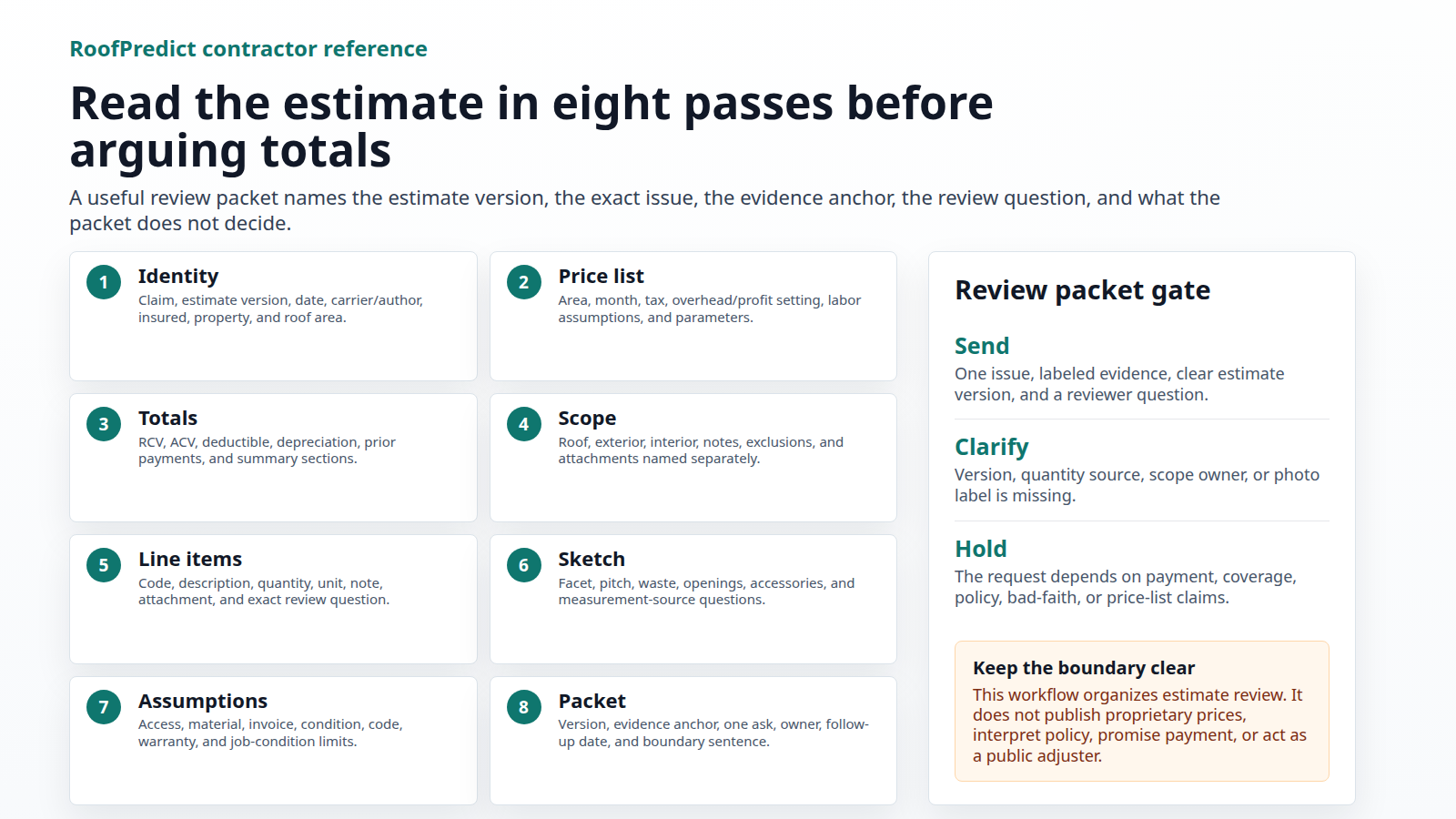
Read an Xactimate estimate in eight passes: verify the estimate identity, check the price list and parameters, read the RCV/ACV/depreciation totals, map the scope, inspect line-item anatomy, reconcile the roof sketch and quantities, compare pricing assumptions to job conditions, then build a neutral evidence packet with photos, notes, documents, and specific review questions. That order keeps the review grounded in facts instead of drifting into line-item folklore or payment promises.
Verisk describes Xactimate as property claims estimating software. That makes it a useful structure for reading an estimate, but it does not make the estimate a public price list, legal opinion, coverage decision, or guarantee of payment. A contractor-safe review says what the estimate shows, what the roof and job conditions show, what evidence is attached, and what should be reviewed. It does not tell a homeowner that an item is automatically owed because it appears in Xactimate.
For RoofPredict, the best product lane is evidence organization. Roof age, storm context, inspection photos, measurement notes, estimate references, and review questions can be assembled into a cleaner packet. RoofPredict should not be framed as replacing Xactimate, publishing proprietary price tables, practicing public adjusting, or deciding claim outcomes.
What An Xactimate Estimate Is And Is Not
An Xactimate estimate is a structured estimating document. For roof work, it usually includes project information, estimate dates, price-list context, parameters, scope sections, sketch or measurement references, line items, quantities, unit prices, depreciation, notes, attachments, and totals. A good reader moves through that structure deliberately.
That structure is useful because it creates places to check the work. A scope item can be missing. A quantity can be linked to a sketch that needs review. A line item can lack a note. A price-list date or location can differ from a prior version. A depreciation setting can change the number a homeowner sees. A photo can exist but not be tied to the item that needs support.
The same structure has limits. An estimate can be incomplete or disputed. It can also include items that still depend on policy terms, contract terms, reviewer decisions, deductibles, limits, exclusions, depreciation rules, or documentation. NAIC homeowner claim-settlement guidance describes adjuster review, policy terms, deductibles, coverage limits, and the possibility of multiple payments. That is why a contractor should keep the conversation evidence-based: what was inspected, what was measured, what is documented, and what needs review.
The safe sentence is: "Here is what the estimate says, here is what the roof evidence shows, and here is the specific review question." That is stronger than "the estimate is wrong" and much safer than "this has to be paid."
Pass 1: Estimate Identity And Version Control
Start at the top of the estimate. Confirm the property address, project or claim reference, estimate version, estimate date, estimator or file label if visible, and whether you are looking at a first estimate, revised estimate, supplement, or comparison copy. Do this before reading totals.
Version control matters because a contractor can lose a review before the facts are discussed. If the homeowner has one PDF, the office has another PDF, and the field rep is looking at screenshots from a third version, the team may be arguing from different documents. Create a simple version note:
| Field | What to record |
|---|---|
| Estimate version | Original, revised, supplement, or comparison copy. |
| Estimate date | Date shown on the estimate or export. |
| Property | Address and roof area involved. |
| Price-list context | Visible price-list location/date if shown. |
| Review purpose | Missing item, quantity question, depreciation question, or scope comparison. |
This first pass often prevents wasted work. If the version changed, the roof scope may not be the only thing that changed. The price list, parameters, depreciation view, tax settings, or attachments may have changed too.
Pass 2: Price List, Date, Location, And Parameters
Next, read the price-list and parameter context. The Xactware glossary entry for price list and the Xactware pricing-parameter help support a practical review question: which price-list context and manual assumptions are being used?
Then check the estimate parameters. Xactimate parameter help, linked in the source table, shows that parameters can include price-list information and add-ons such as labor burdens, market conditions, permits, sales tax, depreciation, and overhead and profit. These fields are not decorative. They can change how the estimate is configured and how totals are displayed.
Do not turn parameter review into a universal entitlement claim. The right questions are narrower:
- Is the visible price-list context consistent with the job location and estimate date?
- Were prices manually edited, overridden, or left as published?
- Are tax, permit, labor burden, market-condition, depreciation, or overhead/profit fields present?
- If an add-on is present, what scope does it apply to?
- If an add-on is absent, what documented job condition makes it worth asking about?
- Are the same settings used across the versions being compared?
This pass keeps the review from becoming a random line-item hunt. Sometimes the issue is not one item. Sometimes the issue is that two estimates were built under different assumptions.
Pass 3: RCV, ACV, Depreciation, And Add-Ons
After parameters, read the totals. Many readers jump straight to the biggest number, but a total only makes sense after the estimate's structure is understood. Separate replacement cost value, actual cash value, depreciation, deductible display, overhead/profit if present, tax if present, and any line or category totals that explain how the number was built.
The practical contractor question is not "Which number helps my argument?" The better question is "Which number is being discussed, and what assumptions feed it?" If the homeowner asks why the payment amount is different from the replacement estimate, explain that an estimate can show multiple values and that payment may depend on policy terms, depreciation handling, deductibles, limits, prior payments, and claim review. Keep that explanation general unless a qualified reviewer has looked at the actual policy and claim file.
For a line-item review memo, capture the displayed total and the exact value being discussed. Do not write "the estimate is short" without saying whether the question is scope, quantity, depreciation, price-list date, tax, permit, overhead/profit, or another parameter. Specificity is what makes the memo reviewable.
Pass 4: Scope Structure, Areas, And Categories
Now read the estimate as a scope document. Xactware's Estimate Items help area and official help for adding a line item in Xactimate X1 support a basic point: estimates are built from items placed into a structure. The item matters, but where it lives in the estimate matters too.
Map the estimate before disputing it:
| Review area | Contractor question |
|---|---|
| Roof system | Are tear-off, underlayment, starter, field shingles, hip/ridge, valley, flashing, vents, pipe jacks, drip edge, debris, access, and protection addressed somewhere when documented? |
| Exterior | Are gutters, downspouts, fascia, siding, windows, screens, paint, soft metals, or accessories separated from roof scope where needed? |
| Interior | If water intrusion exists, is interior work separated from roof work and backed by room photos? |
| Notes and exclusions | Does the estimate state assumptions, exclusions, pending review items, or unsupported areas? |
| Attachments | Are photos, documents, notes, or PDFs tied to the item or section they support? |
The goal is not to force every possible roofing item into every estimate. The goal is to compare the estimate's structure to documented job facts. If the roof is simple, the scope should stay simple. If the roof has multiple planes, unusual penetrations, brittle accessories, interior leak damage, or access constraints, those facts should be visible in the review packet.
Pass 5: Line-Item Anatomy
Only after the scope map should you inspect individual line items. Xactware help for modifying an item unit price, attaching notes, images, sound files, or documents, and adjusting pricing parameters supports a basic point: line-item review is about fields, quantities, assumptions, and evidence, not a public price table. XactAnalysis contractor line-item worksheet help also supports worksheet-style review of fields such as category/selector context, calculation, quantity, RCV, ACV, depreciation, overhead/profit, and components.
Use those fields to make the review concrete:
| Field | What to ask |
|---|---|
| Description | What work or material does the item appear to represent? |
| Category/selector context | Is the item in the right trade, scope area, or section? |
| Unit | Is it measured by square, linear foot, each, hour, or another unit? |
| Quantity | What measurement, count, formula, or sketch field produced the number? |
| Formula/calculation | Is a calculation visible, and does it match the documented roof area? |
| RCV/ACV/depreciation | Which value is being discussed, and is depreciation relevant to the displayed result? |
| Notes | Does the estimate explain the item or its limitation? |
| Attachments | Are photos, documents, or notes connected to this item? |
| Components | Are material, labor, equipment, and related components visible where the worksheet exposes them? |
This table is not a price cheat sheet. It is a review discipline. "The estimate is low" is weak. "The line-item quantity appears to exclude the rear lower facet shown in photos 14 through 18; please review the attached measurement note" is stronger because it names the item, the evidence, and the request.
Pass 6: Roof Sketch And Quantity Reconciliation
For roof work, the sketch deserves its own pass. Xactware roof help includes roof sketch functions involving slope, orientation, eave and rake dimensions, truss spacing, framing type, and roof waste. A contractor review should use those sketch concepts to reconcile the estimate to the roof evidence.
Start with the shape. Compare the sketch to field photos, roof reports, aerial imagery if available, measurement notes, and any inspection record in the file. Then check the details that commonly move roof quantities: facets, slope, ridge, hip, valley, eave, rake, wall intersections, penetrations, chimneys, skylights, dormers, transitions, and waste assumptions.
Write quantity issues as reconciliation notes:
| Quantity issue | Better review language |
|---|---|
| Missing facet | "The lower rear porch facet is visible in photos 14-18 but does not appear in the sketch quantity. Please review inclusion or exclusion." |
| Slope mismatch | "The front right plane appears steeper than the sketch setting used for this section. Attached photos show the slope marker and field note." |
| Penetration count | "The estimate lists two pipe flashings. The labeled roof photos show three pipe penetrations in the replacement area." |
| Waste question | "The roof has multiple small cut-up planes and valleys. Please review whether the documented geometry is reflected in the waste assumption." |
Do not instruct homeowners to climb the roof to prove a quantity. OSHA residential fall-protection guidance, linked in the source table, is a reminder that roof work has serious fall hazards. Homeowner-facing instructions should focus on ground-level photos, safe interior photos, documents, and calling qualified professionals for roof access.
Pass 7: Pricing Assumptions And Job Conditions
Pricing review should be disciplined. Verisk's pricing methodology supports a basic point: local and regional costs matter, and actual job cost can vary with job size, complexity, accessibility, location, contractor overhead, and service level. That does not mean a contractor should argue every price in public. It means the review should tie pricing questions to documented job conditions.
For roofing estimates, useful job-condition evidence often includes:
- Access limitations: steepness, height, staging, driveway limits, fencing, landscaping, neighboring property, or material drop constraints.
- Complexity: cut-up roof planes, multiple pitches, dead valleys, custom flashing, brittle surrounding materials, or unusual penetrations.
- Material handling: drop-zone distance, tear-off path, disposal route, weather protection, and protection of finished surfaces.
- Local constraints: permit requirements, tax treatment, local labor assumptions, or market-condition notes.
- Service level: emergency dry-in, temporary protection, after-hours work, or sequencing that changes labor.
Keep the request factual: "Please review whether the documented access constraints are reflected in the estimate." Avoid: "The carrier has to pay more." The first sentence asks for review of a condition. The second sentence makes a claim the article cannot support.
Pass 8: Evidence Packet And Neutral Review Memo
The final pass turns findings into a packet. Xactimate X1 help says users can attach notes, image notes, sound files, and documents to line items. That makes evidence attachment part of the workflow, not an afterthought.
Use a consistent packet structure:
| Packet part | What to include |
|---|---|
| Estimate reference | Version, page, section, item, quantity, and visible note. |
| Field evidence | Labeled photos, measurement note, roof report excerpt, inspection note, invoice, or product document if relevant. |
| Issue statement | One neutral sentence describing the mismatch, omission, or ambiguity. |
| Review question | One specific question or requested review action. |
| Limits | Any uncertainty, needed measurement, pending document, or reviewer decision. |
Example review memo:
| Field | Example |
|---|---|
| Estimate reference | Revised estimate, roof section, rear elevation, pipe flashing count. |
| Evidence | Photos RP-17, RP-18, and RP-19 show three pipe penetrations on the replacement area. |
| Issue statement | Estimate appears to include two pipe flashings, while the labeled photos show three penetrations in scope. |
| Review question | Please review whether the third pipe flashing should be included or explain the exclusion. |
| Limit | This note does not address coverage or payment; it identifies a documented quantity question. |
That is the line-item review/dispute workflow in its cleanest form: reference, evidence, mismatch, question, limit. It is firm enough to be useful and restrained enough to avoid overclaiming.
Attachment Index That Prevents Review Drift
Many estimate review packets fail after the evidence is collected. The photos are real. The measurement note is real. The estimate question may even be fair. But the reviewer cannot tell which attachment belongs to which line item, roof area, version, or question. That creates delay, extra back-and-forth, and sometimes an avoidable denial or no-response outcome.
Build an attachment index before sending the packet. The index is not a document dump. It is a map from estimate question to evidence.
Use this structure:
| Index field | Required entry | Weak version to avoid |
|---|---|---|
| Packet ID | Short project code, property initials, or internal job number. | No packet name or a generic folder title. |
| Estimate version | File name, estimate date, revision label, and page or section. | "The estimate" without saying which copy. |
| Review question ID | Q1, Q2, Q3, or another stable label. | Multiple questions inside one paragraph. |
| Scope area | Roof plane, elevation, room, trade section, or estimate category. | "Roof" when only one facet or line is involved. |
| Line or section anchor | Visible item description, quantity, note, or category reference. | Screenshot with no page or item reference. |
| Attachment ID | Photo, sketch note, measurement note, invoice, product document, or inspection note label. | Unlabeled image file names from a phone. |
| Evidence role | What the attachment is supposed to prove or clarify. | Attachment included because it "seems relevant." |
| Limit | What the attachment does not decide. | Silent implication that the attachment proves payment or coverage. |
| Owner | Person responsible for answering follow-up. | No one assigned. |
Example:
| Packet ID | Estimate version | Question ID | Scope area | Line or section anchor | Attachment ID | Evidence role | Limit | Owner |
|---|---|---|---|---|---|---|---|---|
| CEDAR-100-Q1 | Revised estimate 2026-05-29, roof section | Q1 | Rear lower porch roof | Pipe flashing count shown as 2 | RP-17, RP-18, RP-19 | Photos show three pipe penetrations in the replacement area | Does not decide coverage or payment | Office review owner |
| CEDAR-100-Q2 | Revised estimate 2026-05-29, sketch | Q2 | Lower rear facet | Roof sketch quantity note | SK-02, MEAS-01 | Measurement note asks whether the lower facet is included | Does not require a scope change by itself | Estimator |
| CEDAR-100-Q3 | Revised estimate 2026-05-29, accessories | Q3 | Chimney area | Flashing scope note | PH-22, INS-04 | Inspection photo and note identify flashing condition | Does not decide code, warranty, or policy terms | Field lead |
Name files so the index and folder agree:
CEDAR-100_Q1_RP-17_rear-lower-porch_pipe-penetration-wide.jpg
CEDAR-100_Q1_RP-18_rear-lower-porch_pipe-penetration-close.jpg
CEDAR-100_Q2_SK-02_roof-sketch_lower-rear-facet.pdf
CEDAR-100_Q2_MEAS-01_measurement-note_lower-rear-facet.pdf
CEDAR-100_Q3_INS-04_chimney-flashing-inspection-note.pdf
Do not use customer names, claim numbers, policy numbers, or private payment details in file names unless your own data policy allows it and the recipient truly needs that information. A packet can be traceable without exposing private information in every attachment title.
The attachment index also forces good triage. If a question cannot be attached to a specific estimate version, line or section anchor, and evidence role, the question may not be ready. Hold it until the team can say exactly what the attachment supports.
Use five attachment rules:
- One question per attachment group. Do not make one folder answer roof quantity, interior repair, overhead/profit, depreciation, and permit questions at the same time.
- One evidence role per attachment. A photo may show a pipe penetration, a slope, or a damaged accessory. Name the role instead of making the reviewer guess.
- Original files stay preserved. Send labeled copies if needed, but keep original photos, PDFs, and notes in the internal project file.
- Private information stays minimized. Homeowner policy pages, claim correspondence, payment records, legal notes, and private customer data should not be attached unless the recipient and review lane actually require them.
- Boundary notes travel with the packet. Every attachment group should leave room for a sentence such as, "This evidence supports a quantity review question and does not decide coverage, payment, legal duties, or policy interpretation."
This is where RoofPredict can be useful without pretending to be estimating software. The product lane is structured evidence: roof age, storm context, inspection photo labels, measurement notes, estimate anchors, attachment IDs, and follow-up owners. A contractor still uses the estimating platform, claim process, and qualified reviewers for their proper roles. RoofPredict can make the packet cleaner before the human review begins.
A Fictional Walkthrough: Cover Page To Line-Item Memo
Use fictional examples in public training material. Do not publish a customer's claim file, licensed screenshots, current proprietary price tables, line-item code sheets, or private carrier notes. The point is to show the reading process, not to expose a real claim or teach a pricing shortcut.
Scenario: a revised roof estimate for a fictional property at 100 Cedar Court includes a roof replacement section. The homeowner asks whether the estimate accounts for a lower rear porch roof that ties into the main rear slope. The contractor's job is not to announce that payment is owed. The job is to read the estimate, compare it to documented roof facts, and send one clear review question.
Step 1: Cover Page And Version
Start with the cover page or first estimate screen. Record the estimate title, property address, estimate date, revision label, claim or project reference if visible, and the person or organization that exported the document. If the field rep, office coordinator, and homeowner are not using the same version, stop the review and reconcile the document first.
| Cover-page field | Fictional entry |
|---|---|
| Estimate title | Revised roof estimate. |
| Property | 100 Cedar Court. |
| Estimate version | Revised export received May 2026. |
| Review reason | Confirm whether lower rear porch roof is included in roof quantities. |
| Boundary note | Estimate-reading memo only; no coverage, legal, or payment conclusion. |
This small table prevents a common failure: sending a supplement note against the wrong estimate. A version mismatch can make a contractor look disorganized even when the underlying roof observation is valid.
Step 2: Price-List And Parameter Screen
Next, capture the visible price-list context and parameters. The memo does not need to quote proprietary prices. It should record whether the team can identify the market/date context, whether taxes or add-ons are visible, and whether any relevant setting differs from a prior version.
| Parameter check | Fictional observation |
|---|---|
| Price-list context | Visible in the estimate header or parameters page; record exact label internally. |
| Estimate date | Matches the revised export date in the file name and PDF properties. |
| Add-ons | Review whether tax, permits, market conditions, depreciation, or overhead/profit are shown before discussing totals. |
| Manual edits | If a price or total appears manually edited, record the field and ask what changed. |
| Public article limit | Do not publish the actual proprietary price-list values in public content. |
For this page, the pricing lesson stops here. The adjacent RoofPredict pricing guide owns detailed price-list and market-variation strategy. This page only needs enough pricing context to read the estimate correctly.
Step 3: Totals Page
Read the totals before arguing about scope. Separate replacement cost, actual cash value, depreciation, deductible display, prior payments if shown, tax if shown, and overhead/profit if shown. The homeowner may call all of these "the estimate," but they are not the same number.
The contractor memo should say, for example: "This review question concerns roof quantity and scope, not the displayed ACV payment amount." That sentence keeps the discussion from sliding into policy interpretation.
Step 4: Scope Tree And Roof Section
Move into the scope tree or roof section. Find the roof area where the rear slope appears. Do not begin with a vague sentence like "the porch is missing." First identify where the estimate appears to account for rear-elevation roof work, related tear-off and replacement activities, accessories, flashing, or notes.
| Scope question | Fictional finding |
|---|---|
| Main rear roof | Main rear slope appears in the roof section. |
| Lower rear porch | Lower porch tie-in is visible in field photos but not clearly identifiable in the scope line or sketch reference. |
| Notes | No note explains whether the porch facet is excluded, included elsewhere, or pending review. |
| Attachments | Photos RP-21 through RP-24 and measurement note MN-03 are ready to attach. |
This is the point where a reviewer can follow the issue. The packet is no longer "the estimate missed something." It is "this specific roof area may not be clearly represented in this specific scope section."
Step 5: Sketch And Quantity Trail
Now reconcile the roof sketch or measurement reference. Look for facets, slope, ridge, hip, valley, eave, rake, wall intersection, porch tie-in, waste assumption, and measurement source. The field team should label photos and measurement notes in the same language it uses in the memo.
| Evidence item | What it shows |
|---|---|
| RP-21 | Ground photo of rear elevation showing lower porch roof below the main rear slope. |
| RP-22 | Side-angle photo showing the porch tie-in and rake edge. |
| RP-23 | Close photo from a qualified inspection showing valley transition and roof-plane boundary. |
| RP-24 | Wider photo showing relationship between main rear slope and lower porch. |
| MN-03 | Measurement note estimating the lower facet dimensions and explaining uncertainty. |
Do not ask the homeowner to climb the roof for a better angle. Use safe ground-level photos, interior leak photos if relevant, roof reports, measurement notes, and qualified inspection evidence.
Step 6: Line-Item Reading
Finally, inspect the specific line or group that would change if the lower porch facet were included. Do not publish item codes or current prices. Read the description, unit, quantity, calculation, section, note, attachment field, and value type being discussed.
| Line-item field | Fictional memo note |
|---|---|
| Section | Roof section, rear elevation. |
| Work description | Tear-off/replacement-related roof work for the rear area. |
| Unit and quantity | Quantity appears tied to main rear slope; lower porch inclusion is unclear. |
| Calculation | Public memo does not publish proprietary formula or price. Internal packet references the visible calculation field. |
| Evidence link | Photos RP-21 through RP-24 and MN-03 attached to the review packet. |
| Review question | Please review whether the lower rear porch facet is included in the roof quantity or identify where it is accounted for. |
| Limit | This is a scope and quantity question only. It does not state coverage, payment, or legal entitlement. |
That final row is the whole discipline. A line-item memo should be easy to verify, narrow enough to answer, and honest about its limits.
Final Memo Example
Here is the complete fictional memo in public-safe language:
| Memo field | Public-safe wording |
|---|---|
| Estimate reference | Revised roof estimate, rear roof section, May 2026 export. |
| Issue | Lower rear porch roof may not be clearly represented in the rear roof quantity. |
| Evidence | RP-21 through RP-24 show the lower porch roof, tie-in, rake edge, and valley transition. MN-03 records approximate lower-facet dimensions and measurement uncertainty. |
| Question | Please review whether the lower rear porch facet is included in the roof quantity or identify where it is accounted for in the estimate. |
| Boundary | This memo identifies a documented scope/quantity question. It does not make a coverage, legal, or payment conclusion. |
The same structure works for a line-item detail question. Suppose the estimate includes two pipe flashings, but the roof photos show three pipe penetrations in the replacement area. The packet should not say, "Xactimate proves the third item must be paid." It should say, "The estimate lists two pipe flashings. Photos RP-17, RP-18, and RP-19 show three pipe penetrations in the replacement area. Please review whether the third pipe flashing is included or explain the exclusion."
That phrasing is more useful for a reviewer, easier for a homeowner to understand, and easier for the contractor to support with evidence. It also keeps the team away from claims it cannot prove from the estimate alone.
When A Review Question Is Not Ready
Some estimate questions should be held until the packet is stronger. Hold the question if the team cannot identify the exact estimate version, cannot find the item or scope section, cannot label the photo, cannot explain the measurement source, or cannot state the question without using payment language. A rushed supplement can make a real issue look vague.
Use a simple readiness test:
| Test | Ready signal |
|---|---|
| Version | Everyone is looking at the same estimate PDF or export. |
| Location | The roof area, elevation, room, or item section is named. |
| Evidence | Photos or documents are labeled and tied to the item. |
| Question | The request asks for review of a fact, quantity, scope item, or assumption. |
| Boundary | The memo avoids coverage, legal, and guaranteed-payment language. |
If one of those fields is missing, improve the packet before sending it. The best estimate reviewers are not louder. They are easier to verify.
Estimate Review Readiness Scorecard
Before a contractor sends an estimate review memo, score the packet. The point is not to make the file look formal. The point is to decide whether the next person can answer the question without guessing.
Use a 0, 1, or 2 score for each row:
| Review factor | 0 points | 1 point | 2 points |
|---|---|---|---|
| Estimate version | Version is unknown or conflicting. | Version is named but not stored cleanly. | Version, date, file name, and source are recorded. |
| Price-list and parameter context | Not checked. | Visible context is noted, but settings are incomplete. | Price-list context, parameter fields, add-ons, and manual-edit clues are captured without publishing proprietary prices. |
| Scope anchor | Issue is described generally. | Scope area is named, but page/item reference is thin. | Page, section, item group, elevation, room, or roof area is named. |
| Evidence anchor | Photos or documents exist but are unlabeled. | Evidence is labeled but not tied to the estimate field. | Each photo, measurement, report excerpt, or document is tied to the review question. |
| Quantity trail | Quantity is disputed without a measurement source. | A measurement source exists, but uncertainty is not explained. | Sketch, roof report, field note, or count is referenced with uncertainty stated. |
| Wording boundary | Memo uses payment, coverage, or blame language. | Boundary language is present but buried. | Memo clearly says the packet raises a scope, quantity, parameter, or documentation question only. |
| Owner and next step | No owner. | Owner is implied. | One person owns sending, response tracking, and version logging. |
Interpret the score conservatively:
| Score | Release decision |
|---|---|
| 0-6 | Hold. The packet is likely to create confusion or invite unsupported claims. |
| 7-10 | Clarify. Send only after the missing version, evidence, quantity, or boundary field is fixed. |
| 11-13 | Send a narrow review memo. Keep the request limited to the supported questions. |
| 14 | Save as a precedent packet. Use the structure as a training example after private customer data is removed. |
This scorecard is useful because it exposes the difference between a real estimate issue and an unfinished internal file. A contractor may have a valid roof observation and still have a packet that is not ready to send. That usually means the team should improve labels, version notes, and wording before escalating the question.
Red-Team The Wording Before Anyone Sends It
The fastest way to weaken a good estimate review is to write more than the evidence supports. Before a field rep, office manager, or owner sends a homeowner explanation or review request, run the wording through a red-team pass. The question is simple: would the sentence still be true if a carrier reviewer, licensed adjuster, attorney, homeowner, and production manager all read it closely?
Use this substitution table:
| Risky wording | Why it is risky | Stronger wording |
|---|---|---|
| "Xactimate says this must be paid." | It turns estimating software into a payment authority. | "The estimate shows this item or field. Please review it against the attached roof evidence and file documents." |
| "The carrier left this off on purpose." | It assumes motive without proof. | "The current estimate does not clearly show this item. Please review whether it is included elsewhere or intentionally excluded." |
| "This roof is totaled." | It can sound like a coverage or engineering conclusion. | "The documented conditions raise replacement-scope questions that should be reviewed by the appropriate qualified reviewer." |
| "The price list is wrong." | It may be unsupported unless version, location, month, and manual edits were checked. | "Please confirm the price-list context and parameters used for this estimate version." |
| "The homeowner is owed the deductible back." | It can imply illegal or improper deductible handling depending on jurisdiction and facts. | "Deductible, payment, and policy questions should be handled through the homeowner's policy and qualified claim review." |
| "RoofPredict proves the scope." | It overstates the product. | "RoofPredict helps organize roof age, storm context, photos, measurements, and review questions so the packet is easier to audit." |
This is not timid language. It is better language. A good estimate memo has the confidence to name the fact, show the evidence, and stop before it becomes a coverage argument.
Internal Handoff Workflow For Contractors
A roofing company should not let every field rep invent a new estimate-review process. The strongest workflow is boring, repeatable, and easy to audit. It separates intake, field evidence, estimate reading, reviewer questions, homeowner communication, and revision tracking.
Use a four-stage handoff:
| Stage | Owner | Output |
|---|---|---|
| Intake | Office coordinator or estimator | Estimate version, property, homeowner permission, review reason, and file location. |
| Evidence build | Field rep or inspector | Labeled ground photos, inspection notes, roof report, safe access notes, interior photos if relevant, and measurement uncertainty. |
| Estimate read | Estimator or supplement reviewer | Scope map, line-item references, quantity questions, parameter notes, and pricing-assumption questions. |
| Communication | Account owner or project manager | Homeowner-safe explanation, reviewer memo, open questions, and next-step log. |
Each stage should leave a trail. If a new person opens the file tomorrow, that person should know which estimate was reviewed, what roof evidence was used, which questions were sent, what was not known, and which statements were intentionally avoided.
The handoff file should include these fields:
| Field | Required note |
|---|---|
| Review status | New, evidence pending, ready for estimate read, sent for review, revised estimate received, or closed. |
| Estimate version | File name, date, export label, and who supplied it. |
| Scope lane | Roof only, roof plus exterior, roof plus interior leak, or multi-trade. |
| Evidence status | Photos labeled, measurement note attached, roof report attached, invoice or material note attached, or evidence gap listed. |
| Claim boundary | Coverage, legal, payment, deductible, and policy questions routed outside the contractor memo. |
| Homeowner note | Plain-language explanation sent or pending. |
| Next action | Exact person, exact task, and date. |
This makes the page useful for operators and readers. The goal is not to win an argument inside the page. The goal is to create a process that makes real estimate review cleaner.
Public Adjusting And Insurance Boundary
Xactimate topics can drift into claim advice quickly. Keep a hard boundary. A contractor can describe roof conditions, estimate fields, job conditions, production constraints, and documentation gaps. A contractor should not use this public article as a script for interpreting policy language, promising payment, negotiating coverage, waiving deductibles, diagnosing bad faith, or telling the homeowner what an insurer must do.
The clean boundary is:
| Contractor-safe lane | Hold for qualified review |
|---|---|
| "The roof photos show three pipe penetrations in the replacement area." | "The insurer must pay for the third pipe flashing." |
| "The estimate version we reviewed is dated May 2026." | "The carrier used the wrong valuation method." |
| "The lower rear porch facet is not clearly accounted for in the scope map." | "The claim was underpaid." |
| "The job-condition photos show limited driveway access and a long disposal path." | "Overhead, profit, tax, permit, or market-condition add-ons always apply." |
| "The homeowner should review payment and deductible questions with the policy and claim reviewer." | "The contractor can handle the deductible or guarantee the payment result." |
This line matters for trust. A page that makes broad insurance claims without jurisdiction, policy, file, or license context is weaker than a page that teaches a verifiable documentation method and names its limits.
RoofPredict Packet Template
RoofPredict's strongest position in this workflow is not "we know the claim outcome." It is "we can help organize a roof evidence packet that a human can review." That packet can support contractors, homeowners, and internal teams without crossing into proprietary pricing or claim decision-making.
Use this template for a single estimate question:
| Packet field | Example entry |
|---|---|
| Property record | Address, parcel or project ID if used internally, and homeowner permission status. |
| Roof context | Estimated roof age source, roof material, visible complexity, known prior repairs, and safe-access limitation. |
| Weather context | Storm date or weather event being discussed, with the note that weather context is not parcel-level damage proof. |
| Estimate anchor | Estimate version, page, section, line item or scope area, and visible quantity or note. |
| Evidence anchor | Photo IDs, roof report excerpt, measurement note, inspection note, invoice, or material documentation. |
| Review question | One sentence asking for review of a fact, quantity, scope item, parameter, or assumption. |
| Boundary note | No coverage, payment, legal, deductible, or policy conclusion. |
| Follow-up owner | Person responsible for sending the packet, tracking response, and logging revised estimate versions. |
For a contractor, this template reduces rework. For a homeowner, it makes the conversation less confusing. For later reviewers, it gives the packet a stable structure: what to collect, what to ask, what not to claim, and where the product fits.
Final Packet Check
A final packet check is the one-page control before the packet leaves the company. It should be simple enough for a production manager to understand and strict enough to stop vague supplement language from going out.
| Final-check field | Required answer |
|---|---|
| Estimate reviewed | File name, version date, revision label, and who provided it. |
| Review lane | Scope, quantity, parameter, attachment, job condition, or homeowner explanation. |
| One-sentence issue | The factual mismatch, omission, or ambiguity. No blame language. |
| Evidence attached | Photo IDs, measurement note, roof report excerpt, estimate page, invoice, material document, or inspection note. |
| Exact ask | One review question that can be answered yes, no, explain, or revise. |
| Boundary sentence | A clear statement that the memo does not decide coverage, payment, legal duties, deductibles, or policy interpretation. |
| Homeowner-safe summary | Plain-language explanation that does not promise an outcome. |
| Internal owner | Person responsible for sending, follow-up, and logging the answer. |
| Follow-up date | Date when the company will check for a response or updated estimate version. |
Here is a usable final-check example:
| Field | Example |
|---|---|
| Estimate reviewed | 100-Cedar-Court-revised-roof-estimate-2026-05-12.pdf, received from homeowner on May 14, 2026. |
| Review lane | Roof quantity and sketch reconciliation. |
| One-sentence issue | The lower rear porch roof is visible in labeled photos but is not clearly identifiable in the roof quantity trail. |
| Evidence attached | RP-21 through RP-24, MN-03, and the roof scope page from the revised estimate. |
| Exact ask | Please review whether the lower rear porch facet is included in the roof quantity or identify where it is accounted for. |
| Boundary sentence | This request identifies a documented scope and quantity question only; it does not make a coverage, legal, deductible, or payment conclusion. |
| Homeowner-safe summary | We are asking for clarification on whether one visible roof area is represented in the estimate. |
| Internal owner | Estimator: J. Smith. Account owner: M. Lee. |
| Follow-up date | May 21, 2026. |
That level of control is especially important when RoofPredict or another system helps assemble the file. Automation can organize evidence quickly, but the send decision still needs a human owner who understands the difference between a documented roof fact and a claims conclusion.
Post-Review Closeout Loop
The work is not finished when the packet is sent. The response needs to be logged, compared to the next estimate version, and turned into a better internal standard. Otherwise, the company repeats the same mistakes on the next job.
Use a closeout loop after each response:
| Closeout step | What to record |
|---|---|
| Response received | Date, sender, channel, and whether a revised estimate was attached. |
| Question outcome | Accepted, denied, explained, moved to another item, more information requested, or no response yet. |
| Estimate version update | New file name, date, revision label, and the prior version it replaced. |
| Scope result | Which scope, quantity, parameter, note, or attachment changed, if any. |
| Evidence gap | What evidence was missing, unclear, late, duplicative, or not useful. |
| Homeowner note | What the homeowner was told in plain language. |
| Training note | What the team should do earlier next time. |
| Product note | Which RoofPredict field, prompt, checklist, or packet view should be improved. |
Closeout records are one of the easiest ways to create original content and better product strategy at the same time. A company can learn which roof evidence gets reviewed cleanly, which wording creates confusion, which job-condition notes matter, and which internal fields are missing. Over time, those patterns become better articles, better templates, better customer messaging, and better software.
For public content, keep the examples anonymized and generalized. Do not publish private claim files, customer addresses, carrier communications, licensed screenshots, current price lists, or line-item code sheets. Publish the method, the checklist, the boundary, and the lesson. That is enough to be useful without exposing private or proprietary material.
When The Revised Estimate Comes Back
A revised estimate is not the end of the review. It is a new document that needs to be compared against the exact question that was sent. Do not assume the revision accepted the question, rejected it, or changed the right item until someone checks the version, scope area, line item, note, attachment, and total display.
Use a revision comparison table:
| Review Item | Original Estimate | Review Packet Asked | Revised Estimate | Status |
|---|---|---|---|---|
| Version/date | Original or prior revision label | Which version was reviewed | New version label and date | Same file, corrected file, or new version |
| Scope area | Roof section, exterior section, interior section, or note area | The exact section under review | Whether that section changed | Accepted, explained, unchanged, or moved |
| Line item or scope item | Item, quantity, note, attachment, or category | One narrow question | New quantity, note, attachment, or exclusion if present | Changed, denied, clarified, or not addressed |
| Evidence link | Photo IDs, measurement note, report excerpt, or invoice | Which evidence was attached | Whether the response references that evidence | Evidence used, ignored, or more evidence requested |
| Boundary | No payment, coverage, legal, or deductible conclusion | Boundary sentence included | Whether response stays in the same lane | Safe, needs rerouting, or hold |
| Homeowner summary | Original homeowner-safe explanation | What the homeowner was told would be reviewed | New plain-language summary | Send, clarify, or hold |
The status words should stay neutral:
Accepted: the revised estimate appears to address the exact review question.Explained: the response says why the item, quantity, note, or assumption did not change.Returned: the reviewer asked for more evidence, a clearer estimate reference, or a different packet.Unchanged: the revised estimate changed other items but did not address this question.Moved: the item appears to be handled in another section, note, attachment, or estimate version.Hold: the answer drifts into policy, payment, legal, deductible, or licensing territory that needs qualified review.
This keeps the contractor from overselling the response. "The revised estimate changed" is not specific enough. A better office note says:
Review packet RP-07 asked whether lower rear porch roof area was represented in the roof quantity trail.
Revised estimate dated [date] added note under rear roof section and revised roof quantity attachment.
Status: addressed for scope representation; no payment, coverage, or policy conclusion made.
Homeowner summary: the revised estimate now shows where the lower rear porch roof was considered. We are saving the version and keeping remaining payment questions outside this memo.
If the revised estimate does not address the question, do not send a frustrated memo. Send a narrower one:
We received the revised estimate dated [date]. The roof quantity question for the lower rear porch is still not clearly answered in the roof section, sketch note, or attachment. Please identify where that roof area is accounted for, or confirm whether additional evidence is needed.
The revised-estimate workflow is where RoofPredict can be useful without making a claim decision. It can store the original estimate, review packet, response, revised estimate, status word, homeowner-safe summary, and next owner. It should not label a revision as "approved," "owed," "underpaid," or "won" unless the company has separate authority and documentation for that claim.
Line-Item Review Without Turning It Into A Price Fight
Line-item review gets sloppy when a team starts from "this price is wrong." A stronger method starts from the visible estimate field and the evidence attached to that field. Price may be part of the conversation, but a public workflow should not publish current price lists, proprietary codes, licensed screenshots, carrier-specific conclusions, or a universal rule for what must be paid.
Use this line-item review ladder:
| Review step | Safe question | Evidence that helps | Weak version to avoid |
|---|---|---|---|
| Description | Does the description match the roof work being discussed? | Estimate page, roof photo, inspection note, material note. | "This line is bad." |
| Unit | Is the unit understandable for the item being reviewed? | Estimate item display, quantity note, measurement record. | "The unit proves the estimate is wrong." |
| Quantity | Is the quantity traceable to a roof area, count, length, square, or documented condition? | Roof report, sketch, labeled photos, field measurements. | "The quantity should be higher." |
| Formula or calculation | Can the quantity path be followed from sketch, dimension, count, or assumption? | Calculation note, roof plan, marked-up measurement sheet. | "They missed something somewhere." |
| Note or attachment | Is the note, image, or document attached to the item that needs it? | Photo ID, file name, attachment list, line-item note. | "We sent photos, so it should be accepted." |
| Parameter | Is the concern really an estimate setting, tax, permit, minimum, O&P, waste, or price-list context question? | Parameter page, totals page, source note, internal reviewer comment. | "All add-ons always apply." |
| Job condition | Is the issue supported by access, height, steepness, disposal, staging, material, or sequencing evidence? | Driveway photos, site notes, safety constraints, delivery notes. | "The job is difficult" with no detail. |
| Boundary | Can the question be asked without coverage, payment, legal, deductible, or policy language? | Boundary sentence and owner review. | "The insurer must pay this." |
The useful review question is narrow:
Estimate version:
Line item or scope area:
Visible estimate field:
Evidence attached:
Question:
Boundary:
For example:
Estimate version: revised roof estimate dated May 12.
Line item or scope area: rear lower roof quantity.
Visible estimate field: roof quantity trail and sketch note.
Evidence attached: roof report page 4, photos RP-21 through RP-24, and measurement note MN-03.
Question: Please identify where the rear lower roof area is included in the quantity trail, or advise whether a clearer measurement attachment is needed.
Boundary: This is a scope and quantity question only; it does not make a coverage, deductible, legal, or payment conclusion.
That structure works because each sentence can be checked. It does not ask the reviewer to accept a vague total, trust a contractor's frustration, or infer coverage from a line item. It asks for the estimate field to be reconciled with the evidence.
Disagreement Log For Two Estimates
Many estimate conversations involve two or three documents: the homeowner's first estimate, a contractor estimate, a carrier or reviewer estimate, and a revised version. Comparing totals alone is a weak method. A higher total can come from scope, quantity, price-list date, parameter settings, job-condition notes, or trade grouping. A lower total can come from exclusions, omitted areas, alternate quantities, depreciation display, or a different estimate purpose. Name that document purpose before comparing totals.
Create a disagreement log before anyone writes the memo:
| Field | Estimate A | Estimate B | What changed | Evidence needed | Safe next question |
|---|---|---|---|---|---|
| Version/date | File name and date | File name and date | Same version or different version | Version labels and source | Which version is the review based on? |
| Estimate purpose | Initial, revised, contractor, reviewer, or internal | Initial, revised, contractor, reviewer, or internal | Different purpose may explain structure | Cover page or sender note | Are these documents meant to answer the same scope? |
| Scope areas | Roof, gutters, interior, exterior, detach/reset, code, mitigation | Same categories for other estimate | Added, removed, moved, or grouped | Scope tree and notes | Which scope area contains the disputed work? |
| Roof quantities | Squares, facets, penetrations, waste, ridge, hip, valley, eave, rake | Same roof quantity fields | Same, different, missing, or unclear | Roof report, sketch, field measurement | Where is this roof area counted? |
| Parameters | Price list, tax, permit, minimums, O&P, depreciation display | Same parameter set | Configuration difference | Parameter pages | Is the difference a setting or a roof fact? |
| Evidence attachments | Photos, notes, measurements, invoices, material docs | Same attachment set | Evidence present, absent, or not linked | Attachment list | Which evidence supports this item? |
| Homeowner message | Plain-language explanation | Plain-language explanation | Confusing, safe, or too broad | Internal summary | What can be said without a payment promise? |
The disagreement log should produce a short status, not a long accusation:
Two-estimate comparison status:
Estimate A and Estimate B use different roof quantity displays. The rear lower roof area is visible in photos and roof report page 4, but Estimate B does not clearly show where that area is represented. The next question is a quantity-trace question, not a payment conclusion.
If the difference is actually a parameter issue, say that:
Two-estimate comparison status:
The scope areas appear similar, but the estimates use different parameter displays. Before asking a scope question, the team needs to confirm whether the difference comes from price-list context, tax, permit, minimum charge, overhead/profit display, or another estimate setting.
This log makes the article more useful for contractors because it matches how real files behave. Estimate disagreements are rarely one clean missing line. They are often a version problem, a scope-tree problem, a quantity-trace problem, an attachment problem, or a communication problem. RoofPredict's role is to keep those differences visible, linked to evidence, and owned by a human reviewer.
Thirty-Minute Review Routine
When time is tight, do not pretend to complete a full estimate audit. Run a thirty-minute triage and label the unresolved work.
| Minute | Task | Output |
|---|---|---|
| 0-5 | Confirm estimate identity and version. | Correct file selected or review paused. |
| 5-10 | Read parameters and totals. | Price-list context, RCV/ACV/depreciation, and add-on notes captured. |
| 10-18 | Map roof scope and sketch. | Roof areas, missing/unclear facets, and quantity questions listed. |
| 18-25 | Match evidence to two or three highest-value questions. | Photos, measurement notes, roof report excerpts, or evidence gaps tied to each question. |
| 25-30 | Write the review memo and boundary note. | One neutral memo, unresolved items labeled, and next owner assigned. |
This routine intentionally limits the number of questions. A packet with three well-supported questions is usually more useful than a packet with twenty vague complaints. If more issues exist, create a second review round after the first version, evidence, and scope questions are clean.
What To Measure After Sending A Review Packet
Estimate-review quality should be measured by operational outcomes, not by how aggressive the memo sounds. Track whether the packet reduced confusion and whether the next reviewer could answer the question.
Useful internal metrics include:
- Percentage of packets with estimate version, page, section, and line-item reference.
- Percentage of photos labeled by roof area and tied to a specific question.
- Number of review questions returned because the evidence was unclear.
- Number of revised estimates received with a version note.
- Average time from homeowner upload to internal estimate-read completion.
- Number of homeowner messages that required a clarification because RCV, ACV, depreciation, deductible, or payment terms were mixed together.
- Number of packets held because the team could not state the question without making a coverage claim.
Those metrics fit RoofPredict's broader value: cleaner files, clearer roof evidence, fewer vague follow-ups, and better handoffs. They also protect the article from becoming another generic SEO page about estimates. The useful asset is the review system.
Reviewer Response Decoder
The estimate review is not finished when the memo is sent. The next answer has to be classified before the team reacts to it. A reviewer response can change the estimate, ask for more evidence, explain where the item already appears, move the question to another role, or raise a coverage/legal issue that the contractor should not decide.
Use a response decoder before writing back to the homeowner:
| Reviewer response | What it may mean | Contractor next step | Homeowner-safe summary |
|---|---|---|---|
| "Already included" | The item may be covered in another line, category, note, assembly, or parameter. | Ask where it is accounted for, then compare the cited line against the roof condition and original question. | "The reviewer says this item is already included elsewhere. We are checking the cited line against the roof evidence before treating the question as closed." |
| "Need more photos" | The packet did not show the condition, location, scale, or roof area clearly enough. | Add labeled wide, medium, close, and roof-area photos from safe/professional sources; keep the same review question. | "The next step is clearer evidence, not a broader claim." |
| "Need measurement support" | The quantity question cannot be answered from the current estimate and photos. | Attach measurement report, annotated sketch, ridge/valley/eave/rake counts, or field measurement note where appropriate. | "The question is still about quantity, so we are adding measurement support." |
| "Different scope" | The review question may be mixing two scopes, trades, rooms, elevations, or roof areas. | Split the packet by scope area and restate the exact line or section being reviewed. | "This needs to be separated into the exact area or line before anyone can compare it fairly." |
| "Policy or coverage issue" | The answer depends on policy language, exclusions, depreciation, deductible handling, or claim settlement. | Stop contractor-written conclusions and route to the qualified reviewer or homeowner's own claim professional. | "That part is outside an estimate-reading memo. It needs the right document and qualified review." |
| "Revised estimate attached" | Something changed, but the change may be partial or unrelated to the original question. | Compare the new version against the original ask, then mark accepted, partially revised, explained, or still open. | "A revised version arrived. We are checking what changed before summarizing it." |
| No response | The packet may need a follow-up owner, clearer subject line, or different contact path. | Log date, method, confirmation, owner, and follow-up deadline. | "We have a sent record and follow-up date; no technical conclusion changes yet." |
The response decoder protects the file from a common mistake: treating every answer as a win or loss. "Already included" may be correct, incomplete, or attached to a different assumption. "Need more photos" may mean the original request was valid but under-documented. "Policy issue" may mean the contractor should stop writing and hand the question to someone with the right role.
RoofPredict should store the response code beside the original question. That lets the company learn whether packets are being returned because photos are weak, quantities are missing, scope is mixed, or the memo is drifting into coverage questions. It also lets future articles and checklists improve from actual review outcomes instead of guessing.
Source Limits
| Source | Use it for | Do not use it for |
|---|---|---|
| Verisk Xactimate | Product context: Xactimate as property claims estimating software. | Coverage decisions, line-item entitlement, or exact pricing. |
| Xactware Glossary: Price List | Price-list context and terminology. | Public current price tables or payment rules. |
| Verisk Pricing Research Methodology | Local/regional pricing context and job-condition caveats. | A fixed public price or a rule that a carrier must pay. |
| Xactware Estimate Items | Estimate-item workflow context. | Proprietary price-list access or coverage conclusions. |
| Add a line item in Xactimate X1 | Estimate Items and Sketch workflow context. | Claims that every added item is owed. |
| Modify the item unit price in X1 | Unit-price field awareness and public-price-table boundaries. | Policy interpretation, settlement advice, or current price disclosure. |
| XactAnalysis contractor line-item worksheet | Worksheet fields for line-item review anatomy. | A guarantee that any field changes payment. |
| Adjust pricing parameters in X1 | Price-list and pricing-parameter review context. | Claims that any add-on always applies. |
| Xactware Roofs | Roof sketch fields and roof quantity review context. | A guarantee that sketch quantities are correct. |
| Attach notes, images, or files | Evidence attachments connected to line items. | A promise that attachments guarantee approval. |
| NAIC homeowner claim settlement | Consumer-level claim settlement boundaries. | Carrier-specific legal or payment advice. |
| FTC disaster-scam guidance | Homeowner communication and consumer-protection cautions. | A claim that every contractor is unsafe or fraudulent. |
| OSHA residential fall protection | Safety boundary for roof access and worker protection. | Homeowner roof-climbing instructions or a complete safety plan. |
RoofPredict Xactimate Estimate Review Matrix
Use this matrix before sending a supplement request, client explanation, or internal review note.
| Pass | What to check | Evidence to attach | RoofPredict value |
|---|---|---|---|
| Identity | Estimate version, date, address, file reference. | Estimate PDF, revision note, comparison copy. | Keeps versions and assumptions organized. |
| Price list and parameters | Price-list context, add-ons, tax, permits, depreciation, overhead/profit. | Estimate parameter screenshot or PDF excerpt if licensed for internal use; otherwise written reference. | Makes configuration differences visible. |
| Totals | RCV, ACV, depreciation, deductible display, category totals. | Estimate totals page and version note. | Prevents mixed-number conversations. |
| Scope | Roof areas, exterior items, interior items, exclusions, notes. | Labeled inspection photos and scope map. | Turns scattered evidence into a reviewable packet. |
| Line items | Description, unit, quantity, formula, details, attachments, tags. | Item-specific photos and measurement notes. | Links evidence to the exact item being reviewed. |
| Roof sketch | Facets, slope, ridge, hip, valley, eave, rake, penetrations, waste. | Roof report, field measurements, annotated roof photos. | Shows where the quantity question comes from. |
| Pricing assumptions | Access, complexity, location, service level, permits, tax, market conditions. | Job-condition photos, access notes, permit notes, invoices if relevant. | Separates real job conditions from vague price complaints. |
| Review memo | Neutral issue statement and specific review question. | Final packet with estimate references and attachments. | Produces a clean handoff for review. |
Homeowner-Friendly Explanation Contractors Can Use
When a homeowner asks what the Xactimate estimate means, keep the explanation simple:
"The estimate is a structured repair estimate. We read it by checking the project details, scope, roof measurements, line items, notes, photos, and documents. If something does not match the roof or the job conditions, we document the difference and ask for review. The estimate does not replace the policy or the review process."
Then add two safety and consumer-protection boundaries. First, do not ask the homeowner to climb the roof for proof. Use ground photos, interior leak photos, documents, and professional inspection evidence. Second, homeowner decisions about coverage, checks, contractor selection, and written contracts should stay in the homeowner lane. The FTC guidance linked in the source table supports verifying coverage, avoiding signing insurance checks over, confirming license and insurance where applicable, getting more than one estimate, and using written contracts.
Common Mistakes When Reading Xactimate Estimates
The first mistake is reading only the total. The total matters, but it is the final output of scope, quantity, price-list context, parameters, depreciation, and add-ons.
The second mistake is comparing two estimates without checking version, date, price-list context, and parameters. A changed setting can create a real difference before any roof fact changes.
The third mistake is treating every missing item as bad faith. Many issues should start as documentation questions: "Was this excluded intentionally?" "Was this facet counted?" "Which photo supports this condition?"
The fourth mistake is sending unlabeled photos. A folder of photos is less useful than a packet that names the estimate item, roof facet, photo number, measurement source, and review question.
The fifth mistake is using public content as a substitute for actual estimating tools, reviewer judgment, licensing, or legal advice. A public guide can teach workflow. It should not publish proprietary price tables or make coverage decisions.
The sixth mistake is failing to close the loop after a response. If a revised estimate arrives and no one records what changed, the team loses the lesson. Log the version, the answer, the evidence that worked, the evidence that did not, and the next packet improvement.
FAQ
What is the fastest way to read an Xactimate estimate?
Use the eight-pass method: identity, price list and parameters, totals, scope, line items, roof sketch, pricing assumptions, and evidence packet. That sequence prevents one line item from hiding a larger version, scope, or quantity issue.
Should contractors start with the line items?
Not usually. Start with the estimate identity, parameters, totals, and scope. If those are wrong or mismatched, line-item review can waste time.
Does an Xactimate line item mean the insurer must pay it?
No. A line item is part of an estimate. Payment, coverage, depreciation, exclusions, deductibles, and review decisions depend on other facts and documents.
Can this page be used as a public Xactimate price list?
No. Do not use it as a public price list. The workflow explains how to read and document an estimate using official product, help, regulator, consumer-protection, and safety-source context.
What should be attached to a review request?
Attach the estimate version, line-item reference, labeled photos, measurements, roof report or sketch note, relevant invoice or material documentation if applicable, and one clear review question.
How should attachments be named for an estimate review?
Use names that connect the file to the packet ID, question ID, roof area or scope section, and evidence role. Keep original files preserved internally, send labeled copies when needed, and avoid putting private claim, policy, payment, or customer information in file names unless that information is intentionally needed for the review lane.
Where does RoofPredict fit?
RoofPredict fits before the argument. It can organize roof evidence, age context, storm context, inspection photos, measurement notes, estimate references, and review questions so the packet is easier to understand. It should not be presented as a payment decision tool.
How should contractors talk about Xactimate without acting like public adjusters?
Stick to visible estimate fields, roof conditions, job-condition evidence, attachments, and review questions. Do not interpret policy language, promise payment, diagnose bad faith, waive deductibles, or tell the homeowner what the insurer must pay.
What makes a supplement or review packet easier to answer?
A narrow packet is easier to answer: one estimate version, one scope area or line item, labeled evidence, one issue statement, one review question, and one boundary note explaining what the packet does not decide.
What should stop a contractor from sending an estimate review memo?
Hold the memo if the estimate version is unclear, the scope area is not named, the photos are unlabeled, the quantity source is missing, the request cannot be stated without payment language, or no one owns the follow-up. Fix those fields before sending.
How can a contractor ask a quantity question safely?
Name the estimate version, the roof area or line item, the visible evidence, and the exact uncertainty. A safe question sounds like: "Please review whether this documented facet is included in the quantity or identify where it is accounted for." It should not say the item is automatically owed.
Should RoofPredict store or publish current Xactimate prices?
No. RoofPredict should organize estimate references, roof evidence, measurement notes, and review questions. It should not publish proprietary current price tables, line-item code sheets, licensed screenshots, or carrier-specific pricing conclusions.
What should happen after the reviewer answers?
Log the response, save the revised estimate version if one exists, record whether the question was accepted, denied, explained, or returned for more information, and update the homeowner-safe summary. Then turn the lesson into a better checklist, prompt, or packet field.
What if the reviewer says the item is already included?
Ask where the item is included and compare the cited line, category, note, assembly, or parameter against the original question. Do not treat the response as accepted or rejected until the team checks whether the cited item actually covers the same roof area, quantity, condition, and scope.
Contractor Checklist
Before asking for review, confirm:
- The estimate version, date, address, and price-list context are identified.
- Parameters and add-ons have been reviewed.
- RCV, ACV, depreciation, and deductible conversations are not mixed together.
- Scope sections match the documented roof and related property conditions.
- Line items under review have item references, quantities, calculations, notes, and attachments captured.
- Roof sketch quantities have been reconciled against photos, measurements, and roof reports.
- Pricing questions are tied to documented job conditions, not generic complaints.
- Photos are labeled by roof area, facet, elevation, or estimate item.
- Homeowner instructions avoid unsafe roof access.
- The review memo uses neutral language and asks a specific question.
- A final packet check exists with owner, follow-up date, exact ask, and boundary sentence.
- The team has a closeout loop for revised estimates, reviewer answers, and future training notes.
- No one is promising that Xactimate, RoofPredict, or a supplement request guarantees payment.
The Roofline by RoofPredict
Stay Ahead of Roofing Market Changes
Join The Roofline by RoofPredict for weekly roofing intelligence: material price signals, storm demand, insurance and regulatory updates, sales tactics, and local contractor opportunities.
Sources
- Xactimate Property Claims Estimating Software — verisk.com
- Xactware Glossary: Price List — xactware.helpdocs.io
- Pricing Research Methodology — verisk.com
- Estimate Items — xactware.helpdocs.io
- Add a line item in Xactimate desktop (X1) — xactware.helpdocs.io
- Modify the item unit price in X1 — xactware.helpdocs.io
- Contractor Line Item worksheet — xactanalysis-sp.helpdocs.io
- Adjust pricing parameters in X1 — xactware.helpdocs.io
- Roofs - Xactware Help — xactware.helpdocs.io
- Attach or delete notes, images, or sound files to a line item in X1 — xactware.helpdocs.io
- What You Should Know About Settling a Homeowners Insurance Claim — content.naic.org
- How To Avoid Scams After Weather Emergencies and Natural Disasters — consumer.ftc.gov
- Fall Protection in Residential Construction — osha.gov